
Operating Systems · Paging
Paging Allocation Example with Frames
Overview
Paging divides physical memory into fixed-size frames and each process's logical address space into pages of the same size.
Because a page exactly fills a frame, a process's pages can be scattered into any free frames, which eliminates external fragmentation without compaction.
This section works a full allocation example on a 16 KB memory with 1 KB frames.
Key concepts
- Frame: a fixed-size block of physical (main) memory.
- Page: a fixed-size block of a process's logical address space; the page size must equal the frame size.
- Page size = frame size: this is the required condition, so a page can be dropped directly into any frame without splitting it.
- Non-contiguous placement: since page size equals frame size, the pages of a process need not occupy contiguous frames — any free frame will do.
- Contiguous placement is preferred when possible: having the liberty to scatter pages does not mean it must be used.
Non-contiguous allocation is used only when necessary — whenever there is a chance to load the process in one place, load it there, because contiguous placement is simpler. - Swapping out: a process waiting for I/O does not need to occupy memory; removing it lets another process that is willing to run be brought in.
A process may also be removed because it completed or became blocked due to some event. Either way it goes back to the hard disk and its frames are freed. - Holes: removing processes from the middle of memory leaves gaps (holes) that are not adjacent to each other.
- Cost of paging: paging removes the limitation of contiguous allocation but introduces new challenges, the first being how addresses are mapped when a process is split across many non-contiguous frames.
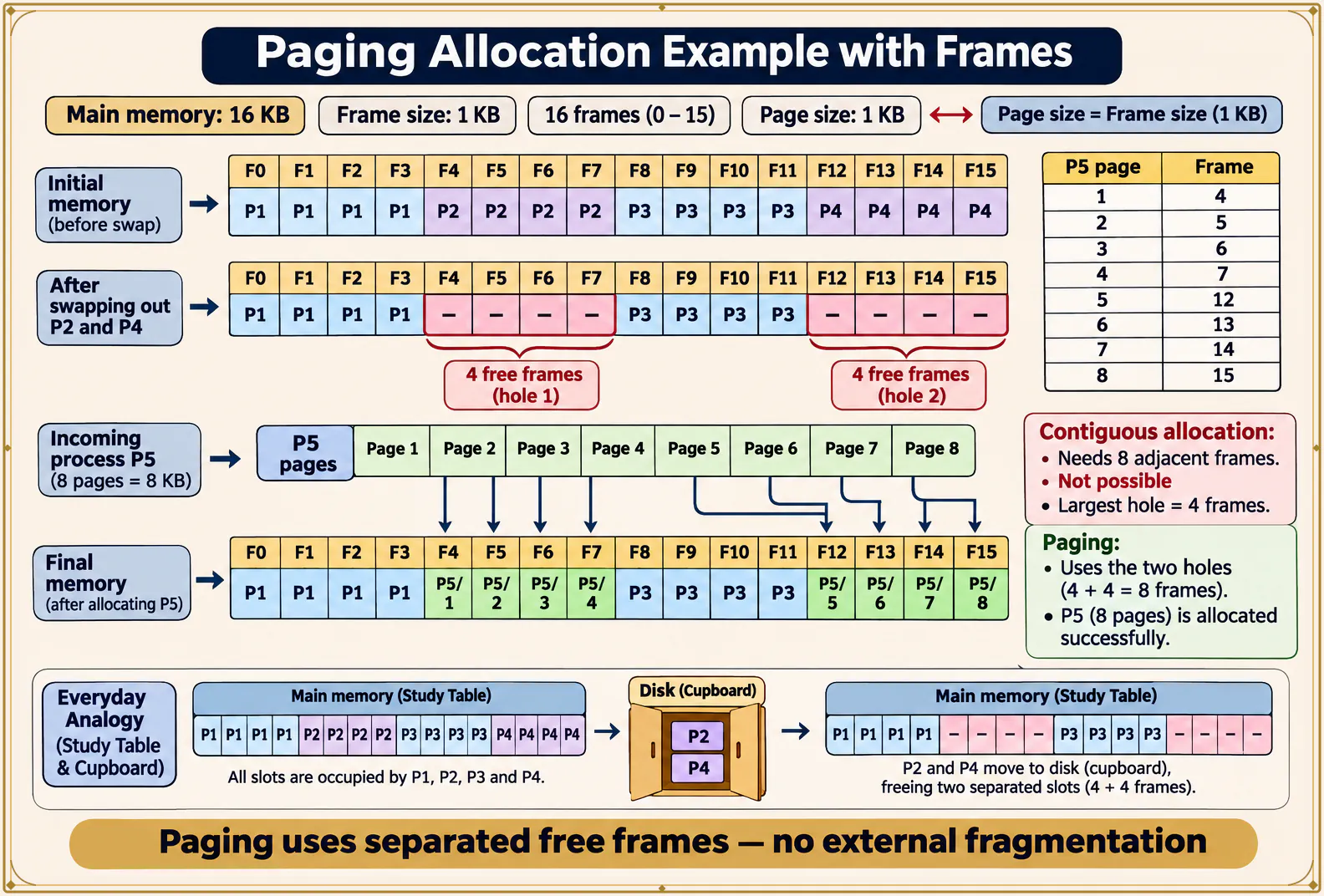
How it works
-
Divide main memory into frames. Main memory is 16 KB and the frame size is 1 KB, giving 16 frames numbered 0 to 15 (0,1,2,3,4,5,6,7,8,9,10,11,12,13,14,15).
-
Divide each process into pages. Page size is also 1 KB, the same as the frame size. Four processes are in use: P1, P2, P3, P4, each containing 4 pages of 1 KB (so each process is 4 KB).
Total demand if all four run together is 4 × 4 = 16 frames, exactly the memory size. -
Initial loading — prefer contiguous placement when frames are free. With all frames free there is no reason to scatter a process, so P1 is placed in frames 0–3, P2 in frames 4–7, P3 in frames 8–11, and P4 in frames 12–15.
Frame 0 1 2 3 4 5 6 7 8 9 10 11 12 13 14 15 Owner P1 P1 P1 P1 P2 P2 P2 P2 P3 P3 P3 P3 P4 P4 P4 P4 -
Processes leave memory. P2 and P4, which are in main memory (in the ready queue), want to perform an I/O operation and must be taken out; alternatively they may have completed or become blocked because of some event.
They are put back on the hard disk, freeing their frames.Frame 0 1 2 3 4 5 6 7 8 9 10 11 12 13 14 15 Owner P1 P1 P1 P1 free free free free P3 P3 P3 P3 free free free free There are now gaps (holes): frames 4–7 (4 frames) and frames 12–15 (4 frames). The two holes are separated by P3 in frames 8–11, so the free space is not contiguous.
-
A larger process arrives: P5 with 8 pages. In contiguous allocation (or dynamic partition allocation) the two 4-frame holes would be useless to a process needing 8 contiguous units — it could not fit even though 8 frames are free in total.
With paging, the 8 pages of P5 are simply dropped into the 8 free frames regardless of location: frames 4, 5, 6, 7 and 12, 13, 14, 15 — completely non-contiguous.Frame 0 1 2 3 4 5 6 7 8 9 10 11 12 13 14 15 Owner P1 P1 P1 P1 P5 P5 P5 P5 P3 P3 P3 P3 P5 P5 P5 P5 -
Conclusion. 8 scattered free frames were sufficient for an 8-page process, so external fragmentation is eliminated completely and no compaction of memory is needed.
Formulas
- Number of frames = Main memory size / Frame size → frames (numbered 0–15)
- Number of pages in a process = Process size / Page size → each of P1–P4: pages; P5: pages
- Required condition: Page size = Frame size (a page exactly fills one frame, with no splitting)
Worked examples
Allocating P5 into non-contiguous frames
- Main memory = 16 KB, frame size = 1 KB → 16 frames, numbered 0–15.
- Loaded processes: P1 → frames 0–3, P2 → frames 4–7, P3 → frames 8–11, P4 → frames 12–15 (contiguous, because frames were free).
- Swap out P2 and P4 (I/O / blocked / completed): free frames = {4, 5, 6, 7} and {12, 13, 14, 15} = 8 free frames in two separate holes.
- P5 arrives with 8 pages (8 KB).
- Contiguous allocation would need 8 adjacent frames — impossible here, since the largest hole is 4 frames.
- Paging allocation: page 1 → frame 4, page 2 → frame 5, page 3 → frame 6, page 4 → frame 7, page 5 → frame 12, page 6 → frame 13, page 7 → frame 14, page 8 → frame 15.
- Result: P5 runs successfully; the total free space is used exactly, no compaction is performed, and there is no external fragmentation.
Comparison
| Aspect | Contiguous / Dynamic Partition Allocation | Paging (this example) |
|---|---|---|
| Placement of a process | Must be in one contiguous block | Pages may go into any free frames |
| Effect of removing P2 and P4 | Creates holes; a hole of 4 frames cannot hold an 8-page process | The 8 free frames in two holes can hold P5 |
| External fragmentation | Present; may require compaction | Eliminated completely |
| Compaction needed | Yes, to combine holes | Not needed |
| Address mapping | Simple (base + offset) | Harder — a process is scattered across frames, so a mapping mechanism is required |
Revision summary
- Frame size must equal page size; then a page maps onto exactly one frame.
- Frames = memory size / frame size: 16 KB / 1 KB = 16 frames, numbered 0–15.
- P1–P4 are each 4 pages of 1 KB; P5 is 8 pages.
- Load contiguously whenever free memory allows it — use non-contiguous placement only when forced.
Non-contiguous allocation is a facility, not a rule. - A process blocked on I/O is swapped out to disk so its frames can be reused by another runnable process; a completed process simply terminates and frees its frames.
- Removing processes in the middle creates non-adjacent holes that contiguous allocation cannot exploit.
- Paging places pages in scattered free frames, eliminating external fragmentation without compaction.
- The cost of this flexibility: address translation becomes a problem, since the CPU only issues logical addresses and does not know the process has been split across memory.
Previous-year exam insights
- For a logical address LA and page size S, page number = floor(LA/S) and offset = LA mod S;
physical address = frame_number * S + offset, since frame size equals page size. - The page number and offset are obtained by splitting the logical address into high-order page-number bits and low-order offset bits;
offset bits = , page-number bits = logical-address bits - offset bits, and frame-number bits = . - Each process has its own page table; the page-table base register points to it, and each page-table entry maps a page number to a frame number and normally contains valid/invalid, protection, dirty, and reference bits.
- Paging has internal fragmentation only in the last page of a process (on average about half a page per process); it creates no external fragmentation in physical memory.
- Number of page-table entries = logical address space / page size;
page-table size = number of entries * PTE size;
multi-level paging reduces the contiguous memory needed for the page table but increases translation cost. - Without a TLB a data access needs two memory accesses (page-table entry and data), so EMAT = 2m;
with a TLB, EMAT = h(t + m) + (1 - h)(t + 2m), where h is TLB hit ratio, t TLB search time, and m memory access time.